Activity 1: Creating Tidy Tables
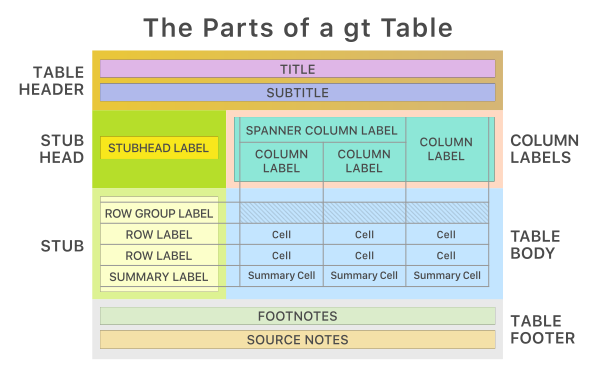
There are many different ways to create tidy tables in R. You might be familiar with the kable function from {knitr} that creates tables for rectangular data. Kable tables don’t have a ton of flexibility, but are great at producing clean, simple tables. As we move into creating tables for the many different statistical models we will learn in this course, we will need to move beyond a simple kable table. That is where {gt} comes in! A {gt} table allows for the following structure, making it ideal for displaying different statistical outcomes.
We are going to use our class survey data to create some tables!
# Load packages
library(tidyverse)
library(gtsummary)
library(gt)
library(janitor)


# Read in class survey data and split into two random groups
class_data <- read_csv("https://raw.github.com/garberadamc/W26-Policy-Eval/main/course-materials/labs/data/W26_class_survey.csv") %>%
  mutate(random_groups = sample(rep(c("control", "treatment"), each = n()/2)))
Let’s create a base table that we will use with both kable and gt.
# Create the base summary object
balance_summary <- class_data %>%
  gtsummary::tbl_summary(
    # Select how you want to group columns
    by = random_groups,
    # Variables to include
    include = c(height, pets, dominant_hand, fav_number),
    # Display mean and standard deviation for all continuous variables
    statistic = list(all_continuous() ~ "{mean} ({sd})")
  ) %>%
  # Add p value
  add_p()

balance_summary| Characteristic | control N = 171 |
treatment N = 171 |
p-value2 |
|---|---|---|---|
| height | 66.4 (4.2) | 63.5 (3.1) | 0.022 |
| pets | 8 (47%) | 14 (82%) | 0.031 |
| dominant_hand | 0.6 | ||
| Left | 3 (18%) | 1 (5.9%) | |
| Right | 14 (82%) | 16 (94%) | |
| fav_number | 0.9 | ||
| 2 | 1 (5.9%) | 4 (24%) | |
| 3 | 2 (12%) | 2 (12%) | |
| 4 | 3 (18%) | 1 (5.9%) | |
| 5 | 3 (18%) | 2 (12%) | |
| 6 | 1 (5.9%) | 1 (5.9%) | |
| 7 | 4 (24%) | 4 (24%) | |
| 8 | 1 (5.9%) | 1 (5.9%) | |
| 9 | 2 (12%) | 1 (5.9%) | |
| 10 | 0 (0%) | 1 (5.9%) | |
| 1 Mean (SD); n (%) | |||
| 2 Wilcoxon rank sum test; Pearson’s Chi-squared test; Fisher’s exact test | |||
Now lets output our balance_summary with a kable table!
balance_summary %>%
  as_kable_extra(caption = "Class Survey Balance Table") %>%
  kableExtra::kable_styling(
    bootstrap_options = c("striped", "condensed", "hover")
)| Characteristic | control N = 17 |
treatment N = 17 |
p-value |
|---|---|---|---|
| height | 66.4 (4.2) | 63.5 (3.1) | 0.022 |
| pets | 8 (47%) | 14 (82%) | 0.031 |
| dominant_hand | 0.6 | ||
| Left | 3 (18%) | 1 (5.9%) | |
| Right | 14 (82%) | 16 (94%) | |
| fav_number | 0.9 | ||
| 2 | 1 (5.9%) | 4 (24%) | |
| 3 | 2 (12%) | 2 (12%) | |
| 4 | 3 (18%) | 1 (5.9%) | |
| 5 | 3 (18%) | 2 (12%) | |
| 6 | 1 (5.9%) | 1 (5.9%) | |
| 7 | 4 (24%) | 4 (24%) | |
| 8 | 1 (5.9%) | 1 (5.9%) | |
| 9 | 2 (12%) | 1 (5.9%) | |
| 10 | 0 (0%) | 1 (5.9%) | |
| 1 Mean (SD); n (%) | |||
| 2 Wilcoxon rank sum test; Pearson's Chi-squared test; Fisher's exact test |
It looks fine… But we can make it a lot nicer with {gt}!
# Convert our balance summary table to a gt table
balance_summary %>%
  as_gt() %>%

  # Add a Title and Subtitle
  tab_header(
    title = "Class Survey Balance Table",
    subtitle = "With Randomly Assigned Groups"
  ) %>%

  # Add a Spanner to group the data columns
  tab_spanner(
    label = "Randomized Groups",
    columns = c(stat_1, stat_2)
  ) %>%

  # Change column labels
  cols_label(
    label = "Variable",
    p.value = "P-Value"
  ) %>%

  # Add a source note at the bottom
  tab_source_note(
    source_note = "Note: Data from the Winter 2026 Class Survey."
)| Class Survey Balance Table | |||
| With Randomly Assigned Groups | |||
| Variable |
Randomized Groups
|
P-Value2 | |
|---|---|---|---|
| control N = 171 |
treatment N = 171 |
||
| height | 66.4 (4.2) | 63.5 (3.1) | 0.022 |
| pets | 8 (47%) | 14 (82%) | 0.031 |
| dominant_hand | 0.6 | ||
| Left | 3 (18%) | 1 (5.9%) | |
| Right | 14 (82%) | 16 (94%) | |
| fav_number | 0.9 | ||
| 2 | 1 (5.9%) | 4 (24%) | |
| 3 | 2 (12%) | 2 (12%) | |
| 4 | 3 (18%) | 1 (5.9%) | |
| 5 | 3 (18%) | 2 (12%) | |
| 6 | 1 (5.9%) | 1 (5.9%) | |
| 7 | 4 (24%) | 4 (24%) | |
| 8 | 1 (5.9%) | 1 (5.9%) | |
| 9 | 2 (12%) | 1 (5.9%) | |
| 10 | 0 (0%) | 1 (5.9%) | |
| 1 Mean (SD); n (%) | |||
| 2 Wilcoxon rank sum test; Pearson’s Chi-squared test; Fisher’s exact test | |||
| Note: Data from the Winter 2026 Class Survey. | |||
The {gt} table looks a lot cleaner! Let’s move on with creating some more {gt} tables!
We are going to use data from the Moland et al. 2013 study on Lobster MPAS.
The data we will be working with has the following variables:
| Variable | Data Type | Descriptions |
|---|---|---|
| year | Numeric (5-levels) | Years measured from 2006 to 2010 |
| region | Character (3-levels) | bol= Bolærne , kve = Kvernskjær , flo = Flødevigen |
| treat | Character (2-levels) | mpa = treatment , con = control |
| cpue | Numeric | Catch per unit effort |
Let’s read in our data to get started!
lobsters <- read_csv("https://raw.github.com/garberadamc/Lab2-EDS241-Moland13/main/data/moland13_lobsters.csv")We will start with creating a table for the total CPUE for each year and region.
To create a table with a column for each region, we need to untidy our data! We will do so by pivoting our data into wide format, with a column for each region, and the CPU for each year in that specific region.
This will be a 2 way table, since we are displaying data for two variables.
tbl_2way <- lobsters %>%

  # Calculate total cpue for each year/region
  group_by(year, region) %>%
  summarize(
      total_cpue = sum(cpue, na.rm = TRUE),
            .groups = "drop") %>% # Same as `ungroup()`

  # Pivot to create column for each region
  pivot_wider(
      names_from = region,
      values_from = total_cpue) %>%
  arrange(year) %>%

  # Add a row for total cpue
  adorn_totals("row")
Time to use {gt} to make this into a nice looking table!!
tbl_2way %>%
  gt(rowname_col = "year") %>%
  tab_header(
    title = "European Lobster Catch by Region and Year",
    subtitle = "Total Catch Per Unit Effort (CPUE) by year and region") %>%
  cols_label(
    bol = "Bolærne",
    flo = "Kvernskjær",
    kve = "Flødevigen") %>%
  tab_source_note(
"Source: Moland et al., 2013")| European Lobster Catch by Region and Year | |||
| Total Catch Per Unit Effort (CPUE) by year and region | |||
| Bolærne | Kvernskjær | Flødevigen | |
|---|---|---|---|
| 2006 | 127 | 122 | 177 |
| 2007 | 269 | 93 | 276 |
| 2008 | 249 | 151 | 367 |
| 2009 | 484 | 168 | 466 |
| 2010 | 463 | 175 | 449 |
| Total | 1592 | 709 | 1735 |
| Source: Moland et al., 2013 | |||
Let’s now add our treat variable into the table, so we can see how lobster catch varied within our control and MPA groups. This will be a 3 way table!
tbl_3way <- lobsters %>%
  # Calculate total cpue for each year/region/treatment group
  group_by(year, region, treat) %>%
  summarize(total_cpue = sum(cpue, na.rm = TRUE),
            .groups = "drop") %>%

  # Pivot to create column for each trt/ control group within each region
  pivot_wider(names_from = c(region, treat), values_from = total_cpue) %>%

  arrange(year)
Time to use {gt} to make this into a nice looking table!!
fancy_table <- tbl_3way %>%
  gt(rowname_col = "year") %>%
  tab_header(
    title = "European Lobster Catch by Year, Region and Treatment",
    subtitle = "Total Catch Per Unit Effort (CPUE)"
  ) %>%
  tab_spanner(
    label = "Bolærne",
    columns = c("bol_con", "bol_mpa")
  ) %>%
  tab_spanner(
    label = "Flødevigen",
    columns = c("flo_con", "flo_mpa")
  ) %>%
  tab_spanner(
    label = "Kvernskjær",
    columns = c("kve_con", "kve_mpa")
  ) %>%
  cols_label(
    bol_con = "Control",
    bol_mpa = "MPA",
    flo_con = "Control",
    flo_mpa = "MPA",
    kve_con = "Control",
    kve_mpa = "MPA")

fancy_table| European Lobster Catch by Year, Region and Treatment | ||||||
| Total Catch Per Unit Effort (CPUE) | ||||||
Bolærne
|
Flødevigen
|
Kvernskjær
|
||||
|---|---|---|---|---|---|---|
| Control | MPA | Control | MPA | Control | MPA | |
| 2006 | 52 | 75 | 54 | 68 | 125 | 52 |
| 2007 | 98 | 171 | 33 | 60 | 114 | 162 |
| 2008 | 78 | 171 | 55 | 96 | 178 | 189 |
| 2009 | 187 | 297 | 51 | 117 | 244 | 222 |
| 2010 | 148 | 315 | 64 | 111 | 198 | 251 |
Time to get REALLY fancy!
We can add plots within our table as well! While maybe not completely necessary in this instance, it can be a helpful tool to have!
table_w_plots <- lobsters %>%
  # Calculate total cpue for each year
  group_by(year) %>%
  summarize(
      total_cpue = sum(cpue, na.rm = TRUE),
      dist_cpue = list(cpue),
      .groups = "drop") %>%
  arrange(year) %>%
  # Create gt table
    gt() %>%
     tab_header(
    title = "European Lobster Catch Totals and Distribution (2006-2010)",
    subtitle = "Total Catch Per Unit Effort (CPUE)") %>%
    cols_label(
    year = "Year",
    total_cpue = "Total CPUE",
    dist_cpue = "Density CPUE") %>%
    # Add in line density plots
    gtExtras::gt_plt_dist(
        dist_cpue,
        type = "density",
        line_color = "blue",
        fill_color = "red")


table_w_plots | European Lobster Catch Totals and Distribution (2006-2010) | ||
| Total Catch Per Unit Effort (CPUE) | ||
| Year | Total CPUE | Density CPUE |
|---|---|---|
| 2006 | 426 | |
| 2007 | 638 | |
| 2008 | 767 | |
| 2009 | 1118 | |
| 2010 | 1087 | |
#install.packages("praise")
#install.packages("cowsay")
#install.packages("beepr")
library(praise)
library(cowsay)
library(beepr)
say("All done making some beautiful tables! :) ", "whale"); beep(3)
 ___________________________________________
< All done making some beautiful tables! :) >
 -------------------------------------------
  \
   \

     .-'
'--./ /     _.---.
'-,  (__..-`       \
   \          .     |
    `,.__.   ,__.--/
     '._/_.'___.-`
Activity 2: Buntaine Policy Study Reading Comprehension Check
With your group, answer the following questions from the Buntaine article.
- What prompted this study?
- How were the treatment and control groups formed?
- Discuss the matched-pairs design of the study. How were neighborhoods paired? Create a diagram if helpful!
- Was the social competition strategy effective?
- What was the primary metric for assessing the impact of the social competition?